By Johnny on
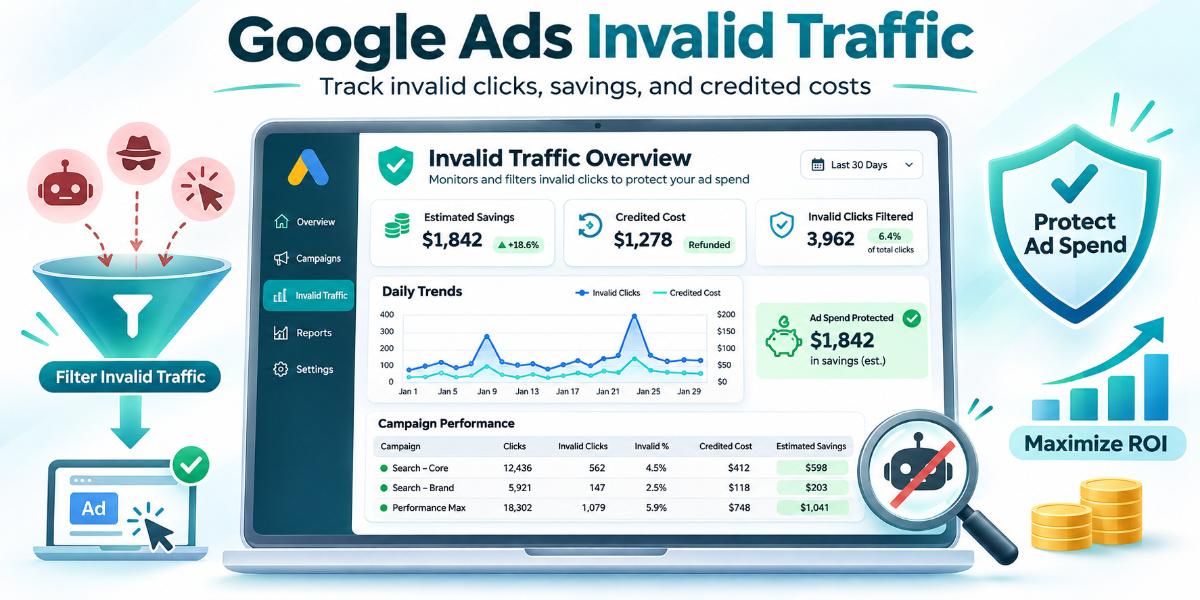
Understanding where invalid traffic sits in your ad account is essential for measuring PPC Management and deciding what to do next. While the standard Campaigns table shows cost and clicks, the Google Ads Overview page now includes an Invalid Traffic Overview Card. By examining this card, you can see estimated savings, credited costs, and daily trends without digging through monthly invoices.
The Invalid Traffic Overview Card
Google rolled out this card on the Overview page under the Campaigns tab. It brings together data that previously required checking multiple reports and billing statements. The card displays three main areas: estimated savings, credited cost, and detailed daily or campaign level reporting.
Estimated savings show the dollar amount Google prevented from being charged by filtering invalid activity before billing. Credited cost shows money returned to your account after Google detected invalid activity in a closed billing period. You can click View details to open a daily trend chart and a table of campaigns with downloadable CSV reports.
What the card does not show
The card reflects activity Google’s systems identified as invalid. It does not show fraudulent traffic that went undetected. It also does not explain why low quality leads might still come from legitimate clicks. For lead generation accounts, the card is a starting point, not a full diagnosis of lead quality.
Check the Card and the Credit Report
Open your Google Ads account and go to the Overview page. Click the Campaigns tab to see the Invalid Traffic Overview Card. Note the estimated savings figure and the credited cost. If you see a high estimated savings number, do not assume that campaign has a traffic quality problem. A campaign with more spend will naturally show higher filtered amounts. Compare the percentage of invalid traffic to total spend, not just the dollar amount.
Next, check the Invalid Activity Credit report. Go to Insights and reports, then Report editor, then Template gallery, then Performance Summary. Select the Invalid Activity Credit: Search & PMax report. This report includes columns like Adjusted cost and Adjusted cost per conversion. It shows how post billing credits affect your performance metrics. Standard campaign metrics lock at month end, so this report is the only place to see those adjustments in your performance data.
Protecting Spend and Maximizing ROI
Invalid traffic wastes budget. When Google filters bot clicks or accidental interactions before billing, your account saves money. The new card makes that saving visible. You can see exactly how much Google caught and how much it credited back. This clarity helps you trust the numbers in your account and focus on real performance.
For accounts with high spend, the card helps you spot if one campaign is drawing more invalid activity than others. You can then investigate that campaign’s targeting, keywords, or creative. If the invalid traffic is low but leads are still poor, the problem is not in the ad account. It is in the lead source or the form. You will need to compare the ad data against your CRM to find the gap.
One small byte of this work is verifying the credit report matches the invoice. The Invalid Activity Credit report in the Report editor is where you confirm the numbers line up.
How you will know it is working
You will see the Invalid Traffic Overview Card on the Overview page in Google Ads. The estimated savings figure will be visible. The credited cost will show any money returned from previous billing periods. The daily trend chart will show spikes or patterns in invalid activity. If you see a spike, you can download the CSV and check which campaigns were affected. The Invalid Activity Credit report will show adjusted costs for Search and Performance Max campaigns. If the adjusted cost is lower than the standard cost, the credit is working. You will know the system is filtering effectively when the estimated savings are consistent and the credited cost is low.
Frequently Asked Questions
Where is the Invalid Traffic Overview Card in Google Ads?
It is on the Overview page under the Campaigns tab.
Does the card show all invalid traffic?
No. It shows activity Google’s systems identified as invalid. It does not show undetected fraud.
Will post billing credits change my campaign metrics?
No. Standard metrics lock at month end. Use the Invalid Activity Credit report to see adjusted costs.
Can I download the invalid traffic data?
Yes. Click View details on the card to download a CSV report by day and campaign.