By Johnny on
AI agents are changing how people interact with websites. Instead of browsing every page themselves, visitors can use AI assistants to research products, compare services, and find information on their behalf. Cloudflare recently introduced more detailed controls that let website owners manage how these personal AI agents access their content. For businesses, this creates an opportunity to support new ways of finding information while maintaining control over automated traffic.
Cloudflare Introduces More Control Over Personal AI Agents
Personal AI agents are automated tools that browse websites or retrieve information in response to a person’s request. Unlike traditional search engine crawlers, which collect and index content for search results, these agents may access a website while actively helping someone complete a task.
For example, someone researching a local service could ask an AI assistant to compare companies in their area. The assistant might visit business websites to gather service descriptions, pricing information, or other publicly available details.
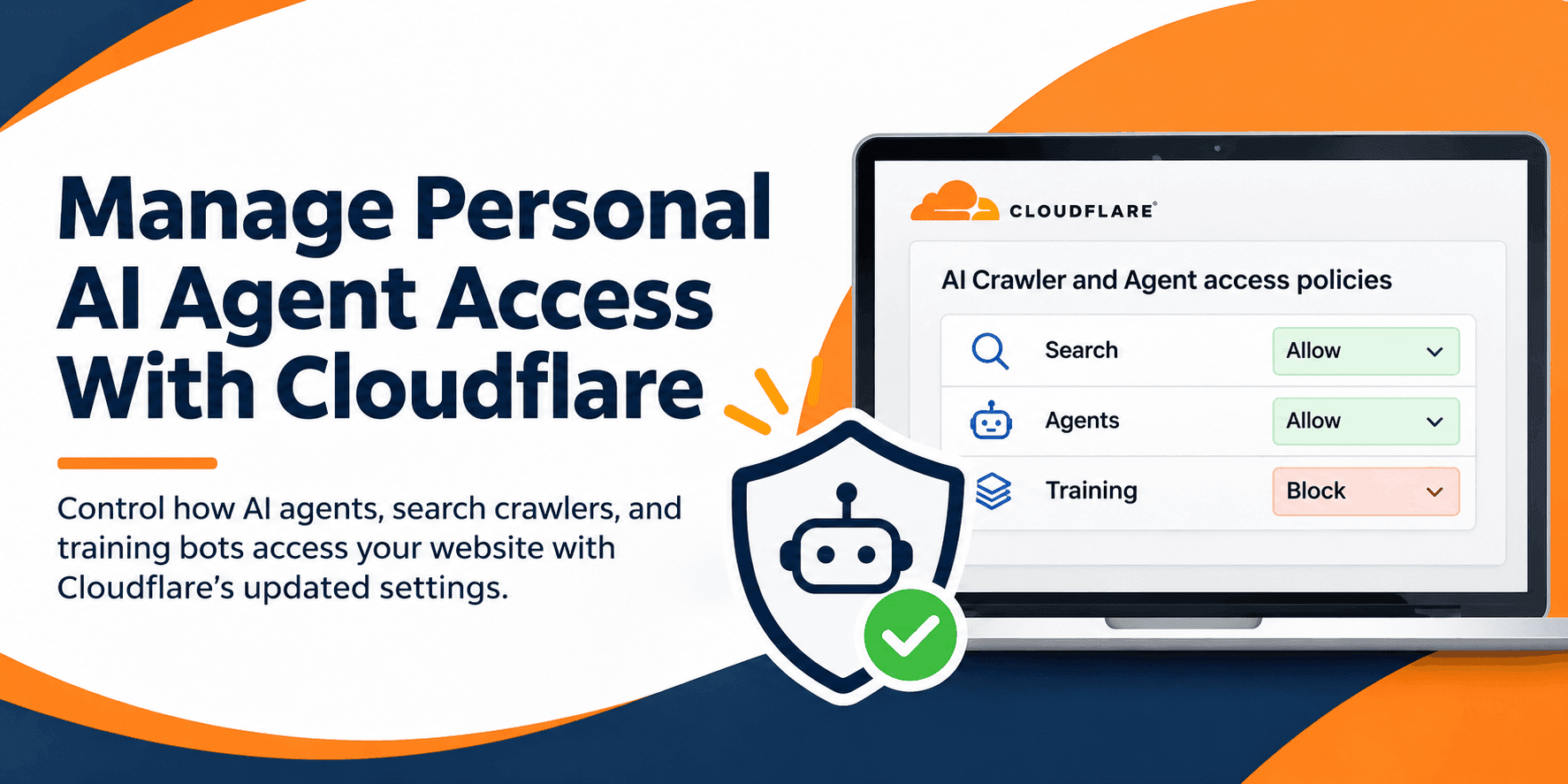
On November 4, 2026, Cloudflare announced new controls for individual personal agents. The company also renamed its existing AI bot settings to AI Crawler and Agent access policies.
These controls allow website administrators to manage supported personal agents individually rather than applying the same policy to every agent. That distinction matters because automated traffic does not always serve the same purpose.
How Cloudflare Manages Different Types of AI Traffic
Cloudflare separates AI traffic into three main categories based on what the automated system is doing.
- Search: Crawlers that collect or index website content so it can be used to answer future search queries.
- Agents: Automated systems acting on behalf of someone, such as an AI assistant retrieving information or browsing a website.
- Training: Crawlers that collect content for training or improving AI models.
These categories help businesses make more informed decisions about access. You might welcome an AI assistant gathering public product information while wanting different restrictions for crawlers collecting content for model training.
Cloudflare supports allowing or blocking these traffic categories, along with an option to block matching traffic on pages where ads are detected. Personal agents inherit the general Agents policy unless individual settings are configured.
Cloudflare currently recommends allowing personal agents by default. That does not mean every website needs identical settings, but it is worth considering whether blocking these tools could prevent potential customers from finding useful information.
How to Review Personal Agent Settings in Cloudflare
If your website uses Cloudflare, you can review the available policies directly from your dashboard. The controls are located under Security settings, within the Bot traffic section.
To review your configuration:
- Open your Cloudflare dashboard. Select the website whose AI agent access you want to review.
- Navigate to Security and Settings. Filter the settings by Bot traffic and locate AI Crawler and Agent access policies.
- Review the current policies. Check the actions assigned to Search, Agents, and Training traffic.
- Examine individual personal agents. Review the available controls for supported agents and decide whether their access should differ from your general Agents policy.
- Save your changes. Confirm the selected actions and review your website’s behavior after updating the settings.
Before changing anything, consider why an agent might need access to your content. Blocking an assistant that retrieves public service information could limit how potential customers research your business.
You should also understand that allowing traffic through these policies does not override every other security control. Existing firewall rules and other security settings can still affect access.
Should Your Business Allow Personal AI Agents?
There is no single answer that fits every website. The right decision depends on the content you publish, how visitors interact with your business, and what you want automated systems to access.
For an ecommerce store, personal AI agents may help shoppers compare products, review specifications, or locate items that meet their needs. A local service company might benefit when an assistant retrieves information about its services, coverage area, or contact details.
Blocking these agents could limit those interactions. However, allowing an agent does not guarantee that it will recommend your business, send visitors to your website, or generate additional sales.
Security still matters. Sensitive account information, administrative interfaces, and customer data should remain protected through appropriate authentication and access controls. Allowing an AI agent to retrieve public information is not the same as granting unrestricted access to private systems.
The goal is to make deliberate decisions instead of treating every automated visitor as either a threat or an opportunity.
Monitoring AI Agent Activity and Website Access
Changing a policy is only part of managing automated traffic. Understanding how those changes affect your website is just as important.
Cloudflare provides security and bot traffic visibility that can help you evaluate automated requests. Its Radar bot directory also provides information about recognized bots and their purposes.
When reviewing access policies, consider whether legitimate requests are being blocked, whether your public content remains available, and whether other security rules are interfering with intended access.
Keep in mind that traditional website analytics and Cloudflare security reporting answer different questions. Google Analytics can help measure visitor activity, but it should not be treated as a complete record of personal AI agent requests or as proof that a specific agent generated a sale.
For businesses using Cloudflare, periodic reviews can help ensure that security controls continue to match how the website is intended to operate.
Preparing Your Website for AI Assisted Browsing
Personal AI agents introduce another way for people to interact with online businesses. While traditional website visitors navigate pages themselves, AI assistants may gather information on their behalf.
That makes clear product descriptions, accurate service information, accessible public content, and properly configured security controls increasingly relevant.
You do not need to allow every automated request, and you should not weaken security simply to accommodate AI traffic. Instead, evaluate the agents you want to support and confirm that your website makes the appropriate information available.
Cloudflare’s updated controls provide a practical starting point for making those decisions without treating every type of AI traffic the same way.
Frequently Asked Questions
What are personal AI agents?
Personal AI agents are automated tools that access websites on behalf of users. They can retrieve information, compare products, or help people complete tasks.
Where can I manage personal AI agents in Cloudflare?
Open Security > Settings in your Cloudflare dashboard, filter by Bot traffic, and select AI Crawler and Agent access policies.
Should I block personal AI agents from my website?
Not necessarily. Allowing supported agents may help people access your public content through AI assistants. Consider your business needs and security requirements before changing the settings.
Can I block individual AI agents instead of all AI traffic?
Yes. Cloudflare supports individual access settings for certain personal agents, allowing you to customize their behavior separately from the general Agents policy.
Does Google Analytics track personal AI agents?
Google Analytics is not a complete source for identifying personal AI agent requests. Cloudflare security reporting is more appropriate for reviewing automated traffic and access decisions.